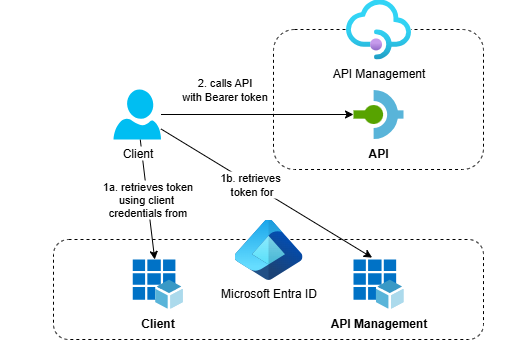
Discover how to secure APIs in Azure API Management with OAuth 2.0 and Microsoft Entra ID using a fully automated, infrastructure-as-code approach. This post walks through deploying everything with Bicep, including app registrations via the Microsoft Graph Bicep extension, so you can avoid manual portal setup and ensure repeatable deployments.
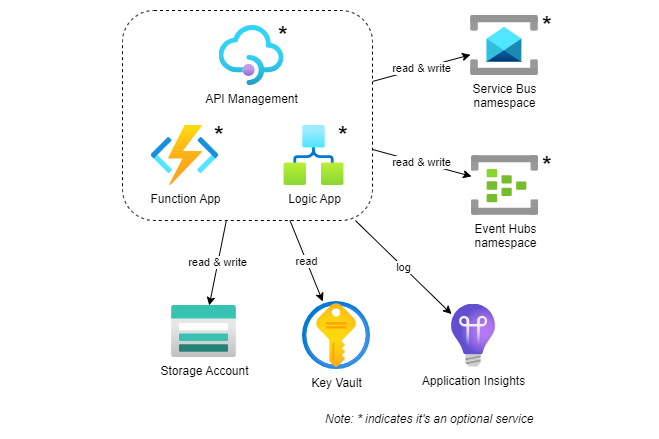
I’ve recently published a Bicep template for quickly deploying Azure Integration Services, including Azure API Management, Function App, Logic App, Service Bus and Event Hubs namespace, along with supporting resources such as Application Insights, Key Vault and Storage Account.
When you have a string value in Bicep with multiple placeholders that you want to replace, it can be tricky to find a good way to do this. In this blog post, I will show you how you can replace placeholders in a string with a couple of user-defined functions.
When deploying Azure resources, it’s a good practice to apply a naming convention to your resources. This will help you to identify the purpose of the resource and the environment it belongs to. In this blog post, I will show you how to apply a naming convention using Bicep user-defined functions. This post also includes a short introduction to the (experimental) Bicep Testing Framework.
In this third post on working with client certificates in Azure API Management, we’ll focus on securing backend connections with mTLS. Using Bicep, we’ll reference a client certificate stored in Key Vault, make it available in API Management and configure a backend resource that uses the certificate during the mTLS handshake.
It’s not uncommon for Azure API Management to be deployed in a Virtual Network, only allowing external access via an Azure Application Gateway. In this second post on working with client certificates in API Management, we’ll explore how to configure an Application Gateway for mTLS and forward the client certificate to API Management for further validation. We’ll also look at the difference between strict and passthrough modes.