
Deploy Azure Workbooks with a Reusable Bicep Module
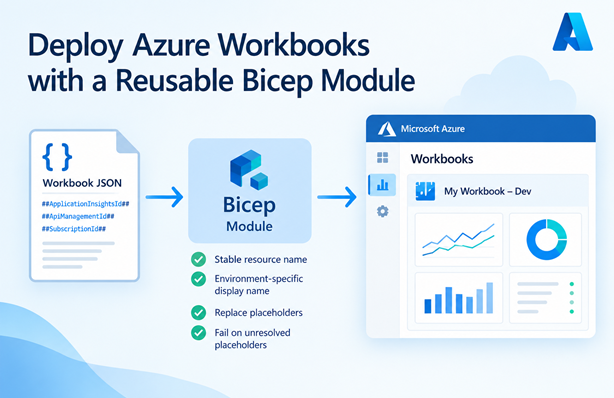
I’ve been deploying Azure Workbooks with Bicep to multiple environments and kept repeating the same boilerplate in every project: constructing a stable name, adding the environment to the display name and replacing environment-specific values in the workbook JSON. To avoid that, I created a reusable Bicep module.
In this post I’ll show how to use the module and walk through its logic. I’ve written about deploying workbooks before in Deploy Azure Workbook and App Insights Function. That post explains how to deploy a workbook using Bicep. This post builds on that and wraps the logic in a reusable module.
Table of Contents
Why a Module?
A workbook is deployed with the Microsoft.Insights/workbooks resource. The resource itself is simple, but a few details need extra attention:
- The resource name of a workbook is a GUID and not something readable. What you see in the Azure portal is the display name. You want the GUID to be stable, so a redeployment updates the existing workbook instead of creating a duplicate.
- When you deploy the same workbook to multiple environments in the same subscription, you want to be able to tell them apart. Adding the environment name to the display name solves that.
- The workbook JSON contains resource IDs, such as the ID of an Application Insights instance or an API Management service. These are different for each environment, so they have to be replaced before deployment.
The module handles all of these. You can find it here.
Sample Usage
Let’s start with how to use the module. The following Bicep template deploys a workbook with the content loaded from a file:
param environmentName string = 'dev'
param location string = resourceGroup().location

param tags { *: string } = {
  environment: environmentName
}

resource appInsights 'Microsoft.Insights/components@2020-02-02' existing = {
  name: 'appi-aisquick-sdc-taqld'
}

resource apiManagementService 'Microsoft.ApiManagement/service@2025-09-01-preview' existing = {
  name: 'apim-aisquick-sdc-taqld'
}

module workbook 'workbook.bicep' = {
  params: {
    environmentName: environmentName
    location: location
    tags: tags
    displayName: 'Sample Workbook'
    serializedData: string(loadJsonContent('./sample.workbook'))
    placeholders: {
      AzureSubscriptionId: subscription().subscriptionId
      ApplicationInsightsId: appInsights.id
      ApiManagementId: apiManagementService.id
    }
    sourceId: appInsights.id
  }
}
The workbook content is loaded with loadJsonContent and converted to a string. The existing Application Insights and API Management resources are used to supply their resource IDs. The Application Insights instance is also the sourceId of the workbook.
loadTextContent can also be used, but
loadJsonContentsupports larger file sizes.
The module has a couple more parameters, such as category and version, which have default values. See the README of the module for a full list and explanation of the parameters.
The sample.workbook file is the workbook JSON that you can export from the Advanced Editor in the portal, as described in my earlier post. In that file, you replace the hard-coded values with placeholders. A simplified example looks like this:
{
  "version": "Notebook/1.0",
  "items": [
    {
      "type": 3,
      "content": {
        "version": "KqlItem/1.0",
        "query": "requests | summarize count() by name",
        "queryType": 0,
        "resourceType": "microsoft.insights/components",
        "crossComponentResources": [ "##ApplicationInsightsId##" ]
      },
      "name": "RequestsPerOperation"
    }
  ]
}
When the module is deployed, ##ApplicationInsightsId## is replaced with the resource ID of the Application Insights instance. The same goes for ##AzureSubscriptionId## and ##ApiManagementId## if you use them in your workbook. Because the environment name is dev, the workbook shows up as Sample Workbook (dev).
The Workbook Module
Now let’s look at the logic in workbook.bicep that makes this work.
Resource Name and Display Name
The module constructs the resource and display name using the specified environment and display name:
var workbookName = guid(resourceGroup().id, displayName, environmentName)
var workbookDisplayName = environmentName == '' ? displayName : '${displayName} (${environmentName})'

resource workbook 'Microsoft.Insights/workbooks@2023-06-01' = {
  name: workbookName
  location: location
  tags: tags
  kind: 'shared' // Only valid value for kind is 'shared'
  properties: {
    displayName: workbookDisplayName
    category: category
    serializedData: ...
    sourceId: sourceId
    version: version
  }
}
The resource name must be a guid. I use the guid function with the resource group ID, display name and environment name as input. This creates a deterministic GUID. The same input always results in the same name, so redeploying the workbook updates it. Because the environment name is part of the input, workbooks for different environments in the same resource group also get different names.
The display name is what users see in the portal. If you specify Sample Workbook as display name and dev as environment name, the workbook is shown as Sample Workbook (dev). Without an environment name, the display name is used as-is.
The kind is set to shared, because that’s the only valid value for this property.
Replacing Placeholders
The workbook content is a JSON string. To replace placeholders in that string, the module uses the approach I described in Replace placeholders in string with user-defined Bicep function. Please read that post for the full explanation of how the reduce function is used to replace multiple placeholders in a string. Here’s the part of the module that does this:
func replacePlaceholders(originalString string, placeholders array) string =>
  reduce(
    placeholders,
    originalString, // this is the first 'current'
    (current, next) => replacePlaceholder(current, next.key, next.value)
  )

func replacePlaceholder(originalString string, placeholder string, value string) string =>
  replace(originalString, '##${placeholder}##', value)

var workbookContent = placeholders == null
  ? serializedData
  : replacePlaceholders(serializedData, items(placeholders!))
The workbookContent variable is set as follows:
- If no placeholders are specified,
serializedDatais used unchanged. - If placeholders are specified, the
placeholdersobject is converted to an array of key/value pairs with the items function. The!operator tells Bicep the value isn’t null at that point. - The
replacePlaceholdersfunction loops over that array withreduceand callsreplacePlaceholderfor each item. - The
replacePlaceholderfunction replaces a single placeholder with its value. For example, a placeholder namedApplicationInsightsIdis replaced where the content contains##ApplicationInsightsId##.
Because the values are inserted as-is, they need to be valid inside a JSON string. That’s no problem for resource IDs and subscription IDs, but keep it in mind if you use other values.
Failing on Unresolved Placeholders
The last piece of logic is setting the serializedData property of the workbook, which I left out of the previous snippet. This is the complete line:
serializedData: !like(workbookContent, '*##*##*')
  ? workbookContent
  : fail('Workbook "${workbookDisplayName}" still contains unresolved placeholders.')
The like function checks if the content contains two ## markers with something optional around them. If it doesn’t, the content is used as-is. If it does, a placeholder is left and the fail function stops the deployment with a message like this:
Workbook "Sample Workbook (dev)" still contains unresolved placeholders.
That gives you an early and clear error instead of a workbook with empty or broken queries.
There’s a limitation to this check. It matches any two occurrences of ## in the content, not only the format of a placeholder. If your workbook has text items with Markdown headings, such as ## Heading, two of them in one workbook would trigger the error. That’s a trade-off for a simple check. If you run into this, you can change the placeholder format or make the check more specific.
Conclusion
With this module, I no longer have to think about the details of deploying a workbook. It creates a stable resource name, makes the display name environment-specific, replaces placeholders in the workbook content and stops the deployment if a placeholder is left behind.
You can find the module and its README on GitHub. For more details on the workbook resource itself, see the Microsoft.Insights/workbooks Bicep resource reference.