
Implement Failover in API Management with a Load-balanced Pool
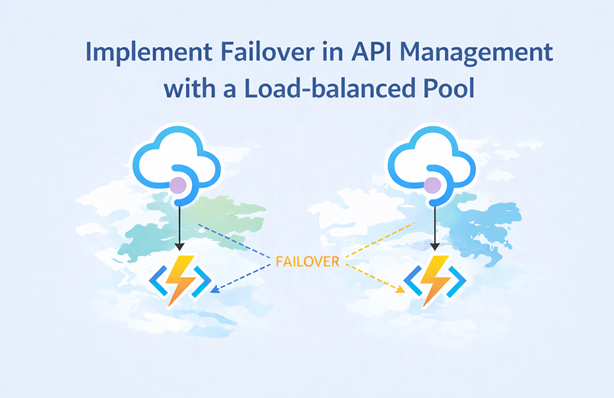
I’ve been working with Azure API Management on integrations where high availability across regions is a requirement. A colleague recently asked if there was a clean failover approach for a setup with API Management in two regions and a Function App backend in each region.
The requirement was simple:
- Requests should go to the Function App in the same region as the API Management instance
- If that Function App is down, traffic should automatically fail over to the Function App in the other region
In this post, I’ll show you how to implement that scenario using load-balanced pools in API Management, backend circuit breakers and the retry policy.
Table of Contents
- Scenario Overview
- Why Load-balanced Pools Are a Good Fit
- Create Backends with Circuit Breakers
- Create a Priority-based Load-balanced Pool
- Configure the API to Use the Pool
- Add Retry to Trigger Fast Failover
- Try It Out
- Conclusion
Scenario Overview
The following diagram shows the target architecture:
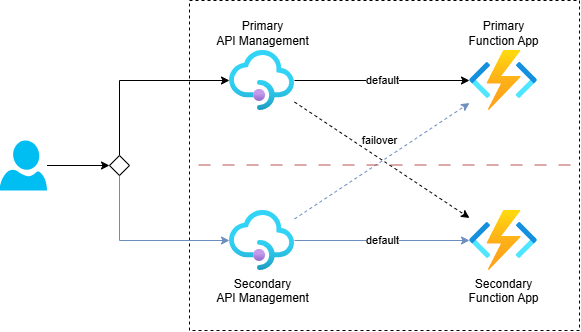
API Management is deployed in two regions. Each region has its own Function App backend.
When a request arrives at API Management in the primary region, it should call the Function App in the same region. But if that backend is unavailable, API Management should fail over to the backend in the secondary region.
One possible approach is custom policy logic that checks responses and manually calls the secondary backend using send-request. That works, but it can add a lot of policy complexity.
Load-balanced pools are a cleaner solution for this scenario.
Why Load-balanced Pools Are a Good Fit
API Management supports three balancing modes in a load-balanced pool:
- Round-robin: Distributes requests evenly across backends
- Weighted: Distributes requests based on backend weights
- Priority-based: Uses higher-priority backend groups first, then lower-priority groups when higher groups are unavailable
For failover, the priority-based option is exactly what we need. Note that lower-priority backends are used only when higher-priority backends are considered unavailable because their circuit breaker rules are tripped.
So the core idea is:
- Define two backends (one for each function app)
- Add circuit breaker rules to each backend
- Put both in a load-balanced pool with regional priority order
Create Backends with Circuit Breakers
Let’s start by creating an API Management backend for a Function App, including a circuit breaker. This uses the Microsoft.ApiManagement/service/backends resource:
resource apiManagementService 'Microsoft.ApiManagement/service@2025-03-01-preview' existing = {
  name: apiManagementServiceName
}

resource functionApp 'Microsoft.Web/sites@2025-03-01' existing = {
  name: functionAppName
}

resource functionAppBackend 'Microsoft.ApiManagement/service/backends@2025-03-01-preview' = {
    parent: apiManagementService
    name: functionAppName
    properties: {
        description: 'The backend for Function App ${functionAppName}'
        url: 'https://${functionApp.properties.defaultHostName}'
        protocol: 'http'
        credentials: {
            header: {
                'x-functions-key': [
                    listKeys('${functionApp.id}/host/default', functionApp.apiVersion).functionKeys.default
                ]
            }
        }
        circuitBreaker: {
            rules: [
                {
                    name: 'rule'
                    tripDuration: 'PT30S'
                    acceptRetryAfter: true
                    failureCondition: {
                        count: 3
                        errorReasons: [
                            'BackendConnectionFailure'
                        ]
                        interval: 'PT15S'
                        statusCodeRanges: [
                            {
                                min: 502 // Bad Gateway
                                max: 504 // Gateway Timeout
                            }
                        ]
                    }
                }
            ]
        }
    }
}
This backend configuration does the following:
- Registers the Function App URL as an API Management backend
- Adds the Function host key in the
x-functions-keyheader - Configures a circuit breaker to detect backend issues
The circuit breaker rule means that if API Management sees three failures within 15 seconds (either BackendConnectionFailure or response codes in the 502-504 range), it opens the circuit for 30 seconds. While the circuit is open, API Management treats this backend as unavailable for pool routing decisions.
Note that the configured tripDuration and failureCondition values are chosen to demonstrate the scenario in this post. When implementing this in a real solution, review and tune these values based on your traffic patterns, backend behavior and recovery expectations.
Create a Priority-based Load-balanced Pool
Next, create a load-balanced pool that references both regional backends:
resource loadBalancedPool 'Microsoft.ApiManagement/service/backends@2025-03-01-preview' = {
    name: 'load-balanced-pool'
    parent: apiManagementService
    properties: {
        description: 'Load balancer for multiple regions'
        type: 'Pool'
        pool: {
            services: [
                {
                    id: currentRegionBackendId
                    priority: 1
                }
                {
                    id: otherRegionBackendId
                    priority: 2
                }
            ]
        }
    }
}
It uses the same service/backends resource type as a normal backend, but with type: 'Pool'.
In the primary region:
- The backend for Function App in the primary region gets priority
1 - The backend for Function App in the secondary region gets priority
2
In the secondary region, you reverse that setup.
With that in place, API Management uses the local backend first. If the local backend circuit breaker is open, the next request goes to the next priority group, which is the backend in the other region.
Configure the API to Use the Pool
You can configure the pool in the inbound section with set-backend-service, just like a regular backend:
<inbound>
    <base />
    <set-backend-service backend-id="load-balanced-pool" />
    <rewrite-uri template="api/ProcessRequestFunction" />
</inbound>
This policy does three things:
- Inherits base policies with
<base /> - Routes the operation to the
load-balanced-poolbackend - Rewrites the incoming URI to the Function route path
From this point on, backend selection is handled by the pool configuration and circuit breaker state.
Add Retry to Trigger Fast Failover
It’s important to note that a load-balanced pool does not retry within the same client request by itself. For example, if the selected backend returns a 503, that 503 is returned to the client unless you add retry logic.
Without retry, you would need multiple client calls to trip the circuit breaker and after three failing calls within 15 seconds, the fourth client call would reach the secondary region. To make failover happen within one request, add the retry policy in the backend section:
<backend>
    <retry condition="@(context.Response.StatusCode >= 500)"
           count="3" interval="1" first-fast-retry="true">
        <forward-request buffer-request-body="true" />
    </retry>
</backend>
Here’s how this works:
forward-requestsends the request to the pool backend- If the response status code is 500 or higher, API Management retries
- After repeated failures, the primary backend circuit breaker opens if the failure conditions are met
- A subsequent retry attempt in the same flow is routed to the secondary backend
Set buffer-request-body="true" when retrying forward-request. Without request buffering, retries of requests with a body can fail with a content length mismatch. See this Stack Overflow explanation for details.
Try It Out
I’ve created a working sample here: Failover with Load-Balanced Pool. See the README for deployment instructions and details.
These files are useful to inspect:
- api.bicep: Deploys the API with the load-balanced pool and backend wiring
- backend.bicep: Deploys a backend with circuit breaker rules
- process-request.policy.xml: Shows the use of the load-balanced pool and retry policy that triggers failover within a single request
- ProcessRequestFunction.cs: Backend Function that returns status codes based on input
- tests.http: Ready-to-run HTTP test requests
Use this request against one API Management instance (change the hostname and function app names as needed):
POST https://apim-primary-sdc-orfff.azure-api.net/resilient-api/
Content-Type: application/json

[
    {
        "functionApp": "func-primary-sdc-orfff",
        "respondsWithResultCode": 503
    },
    {
        "functionApp": "func-secondary-nwe-g5bv4",
        "respondsWithResultCode": 200
    }
]
This payload tells each Function App how to respond. In this example:
- The primary Function App returns
503 Service Unavailable - The secondary Function App returns
200 OK
With retry enabled, API Management will retry, trip the primary backend circuit breaker and then route to the secondary backend. The response would look like this:
HTTP/1.1 200 OK
Content-Type: application/json
X-Attempt-Count: 4

{
    "functionAppName": "func-secondary-nwe-g5bv4",
    "region": "Norway East"
}
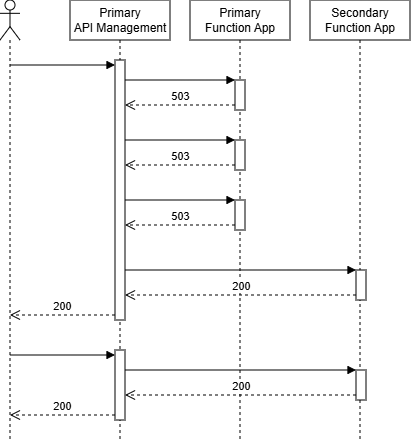
The body shows that the request was processed by the secondary backend, while the X-Attempt-Count header shows that API Management made multiple attempts to get a successful response:
1when the local backend succeeds immediately4when the first backend fails three times, then the fourth attempt is sent to the secondary backend1for repeated requests made within 30 seconds, because the primary circuit is still open and API Management directly selects the secondary backend
The sequence below shows both cases: failover after circuit-breaker trip and direct routing while the circuit remains open.
Conclusion
Priority-based load-balanced pools are a clean way to implement regional failover in API Management. You can keep policy logic simple while still getting robust failover behavior.
The combination used in this post is:
- Backend circuit breakers to detect unhealthy backends
- Priority-based pools to prefer local region and fail over to secondary region
- Retry policy to make failover happen within a single client request
That setup gives clients a much smoother experience during regional backend failures, while still keeping the configuration easy to reason about.